How Gharzemoon Works
From initial agreement to final settlement; 7 simple steps without complex accounting jargon.
Select or Add Contact
Tap the (+) button to create a new agreement. Pick a friend directly from your phone contacts or type their name. Enter their mobile number if you'd like to invite them for mutual bilateral confirmation.
Choose Direction & Asset Type
Indicate whether 'I Lent' (receivable) or 'I Borrowed' (payable). Then specify whether the asset is 'Cash / Money' or 'Item / Belonging Lending'.
Specify Amount or Item Details
For financial loans, set the nominal amount and currency. For item lending, write the item description and bundled accessories (e.g. camera lens, charger, case) and handover condition.
Set Due Date & Automated Reminders
Choose the expected return date. Configure multiple friendly reminder intervals (e.g. 1 week ahead, 3 days before, or on the exact due date) to trigger non-intrusive notifications.
Submit & Request Bilateral Confirmation
Once submitted, the record is saved. If a phone number was included, the other party receives an invite or in-app bilateral prompt to review and confirm with one tap.
Monitor in Timeline & Person Dossier
Track all active agreements in your Home dashboard, monthly calendar view, and individual contact ledgers. Check balances, active gear on loan, and overdue statuses instantly.
Record Repayments, Receipts & Settlement
When money is repaid or items are returned, log partial or full settlement with an attached receipt screenshot. The agreement is archived with a clear, permanent audit trail.
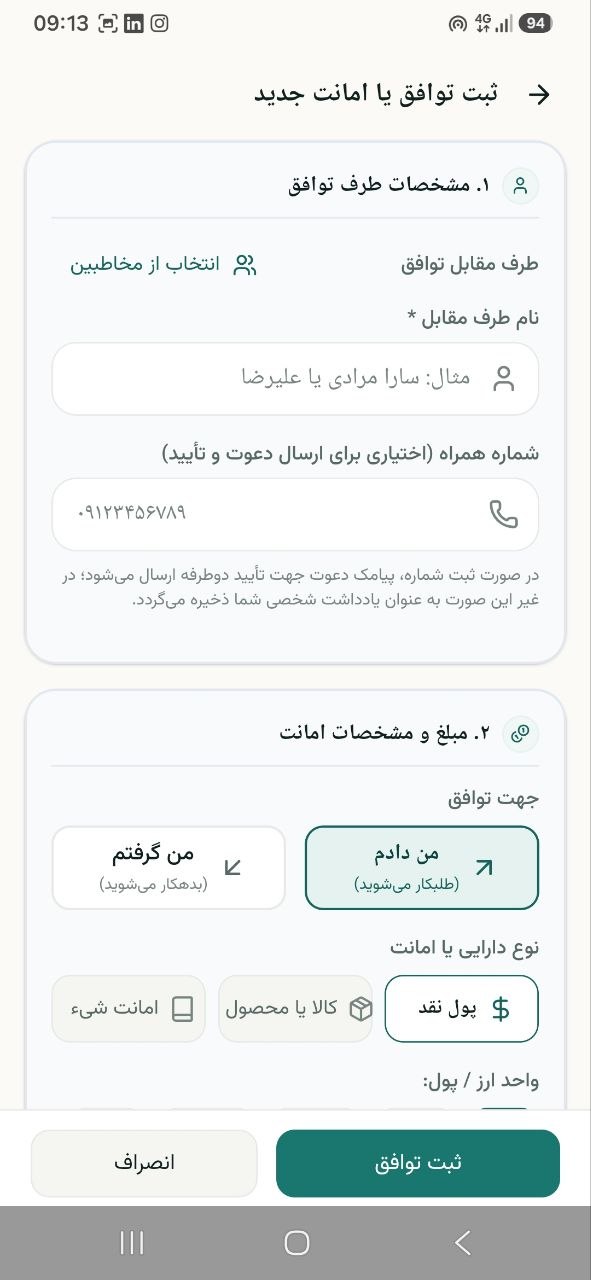
Step 1: Contact selection and agreement party setup
Start Tracking Your Agreements with Ease Today
Download the official Gharzemoon app on Android or access via Web. Keep your finances clear, your borrowed items organized, and your friendships peaceful.